
Peace Officer Standards and Training

End of Employment Action

Log in to the Acadis Portal. Once logged in, go to “Workforce” → “Personnel.” This will load a list of all personnel currently recorded in your agency. To end (or edit) someone’s employment, simply click the three dots to the right of the individual’s row and select “Update Employment.”
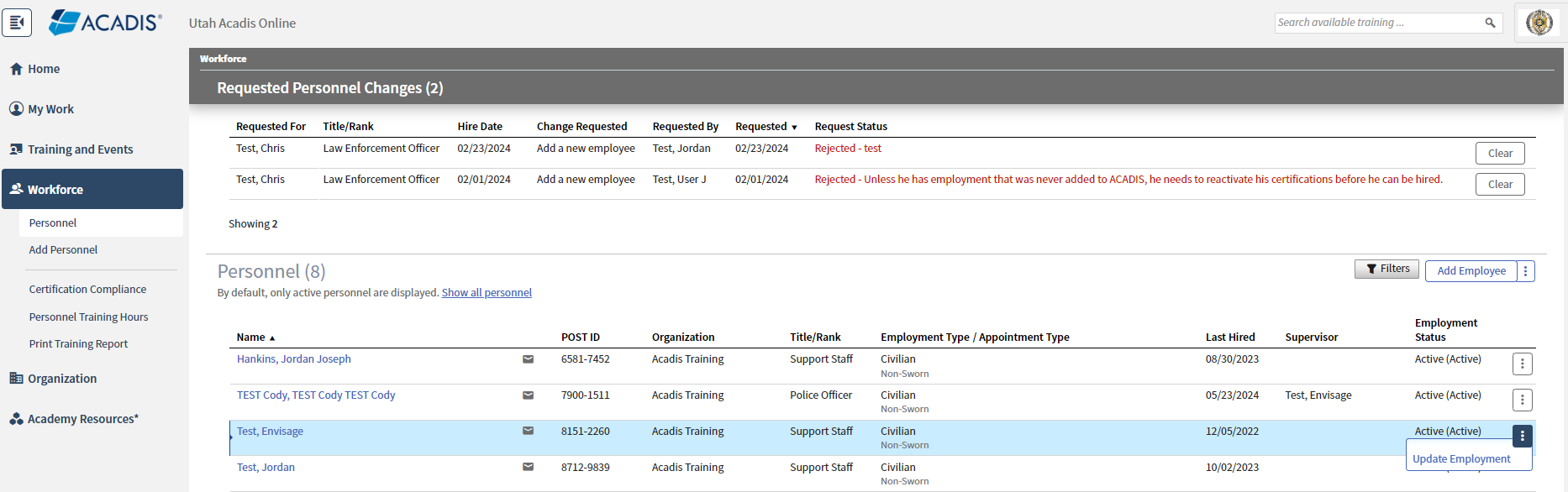
A screenshot of the 'Personnel' page in the Acadis portal. The 'Workforce' tab is active in the sidebar. The page displays a table of 8 personnel and a 'Requested Personnel Changes' section. For the entry 'Test, Envisage', a three-dot menu is open with the option 'Update Employment' highlighted.

Fill out the requested information, along with any clarifying comments or documents, and then click “Submit Request.”

A screenshot of the 'Request Employment Update' form for 'Test, Envisage' in the Acadis portal. The form includes fields for 'Update Action', 'Effective Date', 'Title/Rank', and 'Employment Type'. At the bottom, there is a section for documents and a blue 'Submit Request' button.

The request will be submitted and processed by one of our technicians at POST.

Last updated 25 September, 2024